|
Nginx - Use PHP [PHP-FPM]
2013/07/07 |
|
Configure Nginx to execute PHP script.
This example shows to use PHP-FPM ( PHP FastCGI Process Manager ). |
|
| [1] | Install PHP & PHP-FPM |
|
[root@www ~]# yum --enablerepo=epel -y install php php-mbstring php-pear php-fpm # install from EPEL
|
| [2] | Configure PHP-FPM |
|
[root@www ~]#
vi /etc/php-fpm.d/www.conf # line 39: change user = nginx # line 41: change group = nginx
[root@www ~]#
/etc/rc.d/init.d/php-fpm start Starting php-fpm: [ OK ] [root@www ~]# chkconfig php-fpm on
[root@www ~]#
vi /etc/nginx/conf.d/default.conf # add follows in a "server" section
    location ~ \.php$ {
        fastcgi_pass   127.0.0.1:9000;
        fastcgi_index  index.php;
        fastcgi_param  SCRIPT_FILENAME  $document_root$fastcgi_script_name;
        include        /etc/nginx/fastcgi_params;
    }
/etc/rc.d/init.d/nginx restart Stopping nginx: [ OK ] Starting nginx: [ OK ] |
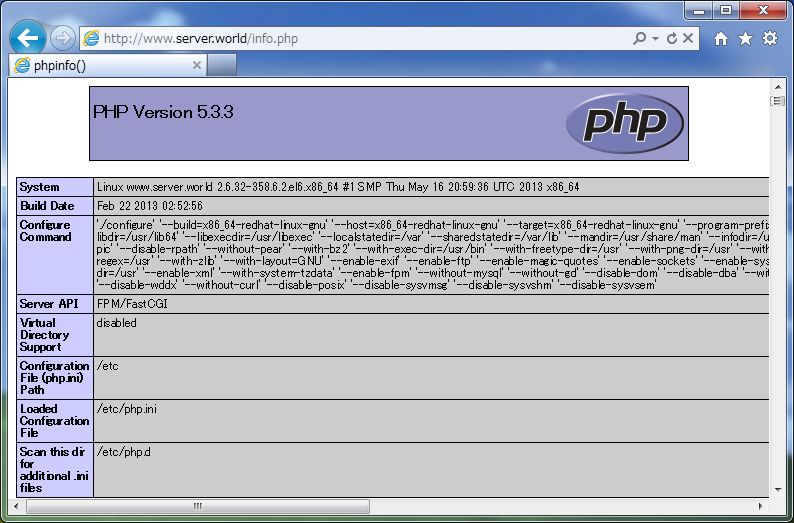
| [3] | Create a PHPInfo script and make sure PHP works or not. It's Ok if following page is shown normally. |
|
[root@www ~]# echo "<?php phpinfo() ?>" > /usr/share/nginx/html/info.php |
|